01. The problem
The foundation of the product was the hardest part to trust
It’s difficult to understand what’s connected, what’s disconnected, and which clients are affected. When something disconnects, I have to dig through multiple accounts to figure out what happened and manually fix each connection.
— AgencyAnalytics customer
Data sources are the foundation of AgencyAnalytics. Reports and dashboards depend on them. But the connection experience hadn’t been meaningfully revisited in years, and complexity had accumulated: inconsistent terminology, confusing connection states, and no clear way to see which clients were impacted when something broke. It was one of the most frequently complained-about areas in our NPS feedback.
02. Research
Five problems that kept coming back
I queried our customer request system for connection-related tickets, analyzed interviews and recordings, and used data analysis to find patterns, organizing everything into customer needs, pain points, and opportunities.
- ReconnectingData sources frequently disconnected, with no easy way to reconnect multiple at once.
- ImpactNo indication of which clients were impacted when a connection broke.
- Two experiencesDifferent, inconsistent management experiences at the account vs. client level.
- DeletionA main account couldn’t be deleted without manually removing every client connection first.
- LanguageInconsistent terminology and connection states across the product.
03. Audit
The problems weren’t isolated
With a clearer picture of the customer problems, I mapped the existing connection and management experience across the entire application.
Inconsistencies in navigation, terminology, and connection states showed up everywhere the account/client relationship appeared.
- 01Map every surfaceThe connection and management experience, across the entire application.
- 02Document findingsInconsistent navigation, terminology, and connection states, wherever they appeared.
- 03Review with leadershipThe full audit, with every finding, reviewed with leadership.
- 04Track and prioritizeOne spreadsheet, with each finding prioritized as its own project.
Quick wins first
Not every problem needed a full redesign. I flagged smaller usability issues a developer could fix quickly, so the experience started improving immediately, well before the larger redesign shipped.04. The data model
One account, many connections, many clients
One of the most important parts of the project was understanding how connections actually worked behind the scenes. The relationship wasn’t obvious to users, but the UI needed to communicate it clearly.
Exploring directions with prototypes, not wireframes
Rather than jumping straight to detailed wireframes, I built a series of lightweight, AI-powered prototypes to explore different directions quickly. They gave us a concrete way to discuss ideas, surface trade-offs, and evolve the experience with the team.
Reviewing them with the developers who’d build them surfaced technical limitations and edge cases early, before we’d invested time in polish.
Once we aligned on a direction, I moved into detailed design and broke the work into implementable projects. The goal throughout: make connecting a data source feel simpler, more predictable, and easier to manage.
05. Connecting
From one at a time to every account in one pass
Make integrations easier to find
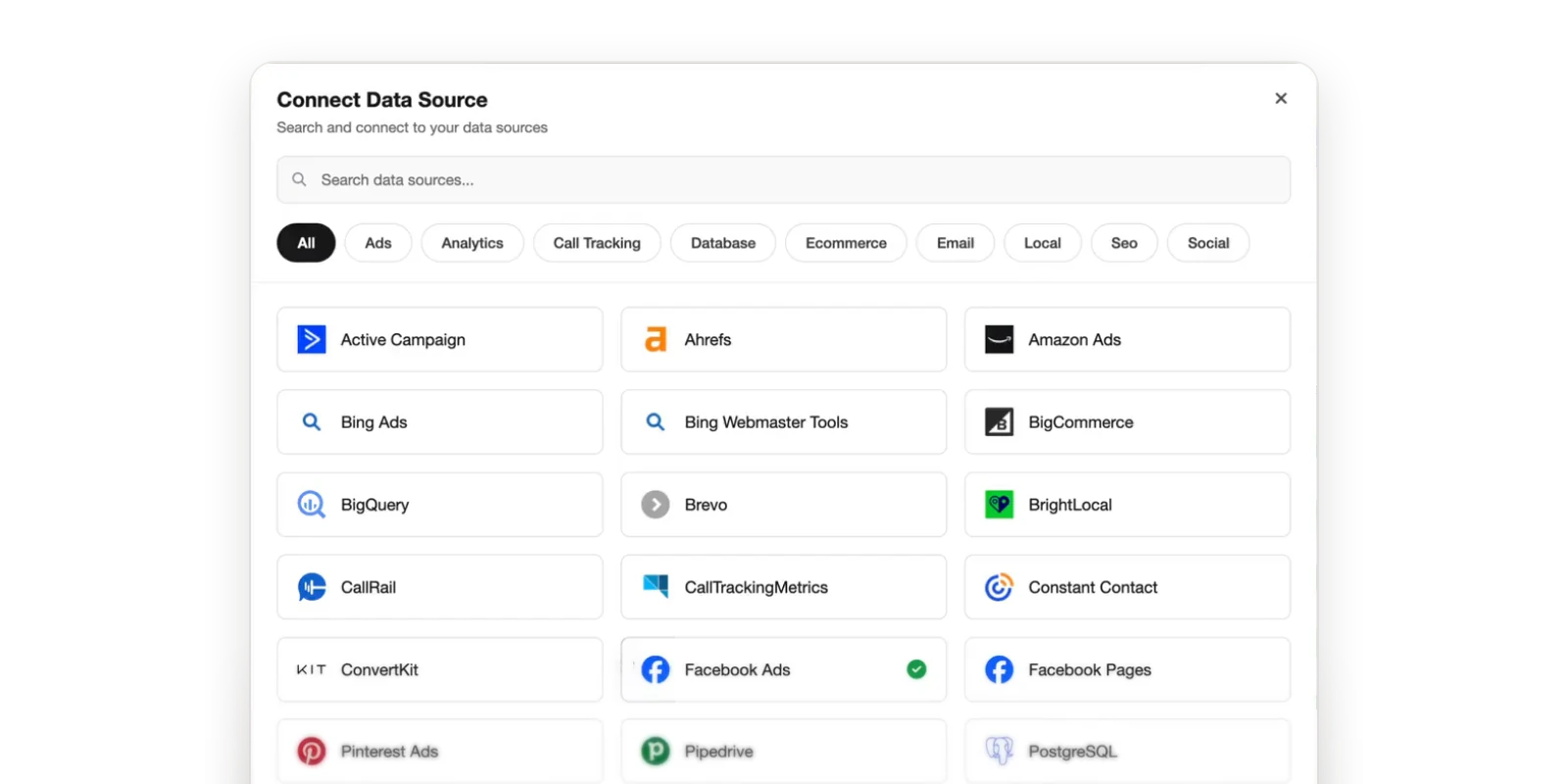
I redesigned integration search to align with patterns used elsewhere in the product. Quick category filters made browsing easier, while a more prominent search field supported the behavior we saw most in our data: users searching directly for the integration they wanted.
Connect multiple accounts at once
After selecting an integration, users see every available account and can select multiple to connect. Instead of forcing them through the connection flow one account at a time, they select every account they need in one pass. The layout also follows our tertiary navigation pattern, making it clearer where the user is and which account they’re working with.
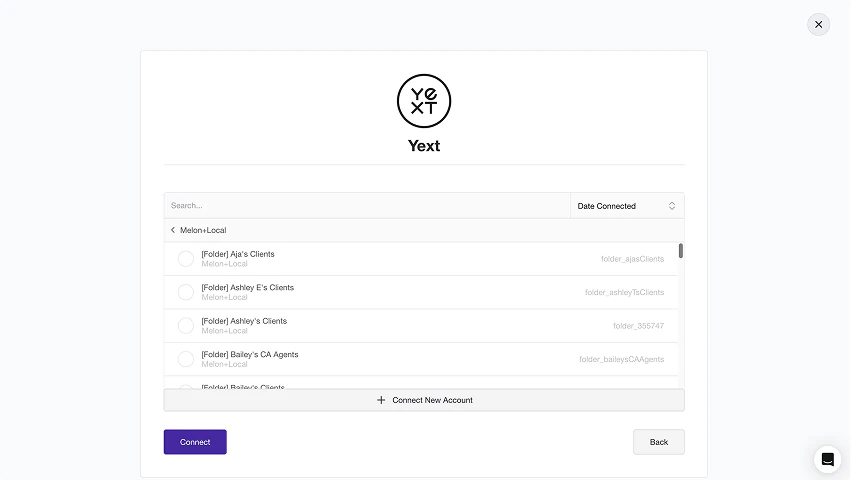
time to connect
Multiple accounts at once instead of one by oneDesigning for connection states
Connections don’t always behave the way users expect, so I designed for the states where they needed guidance most.
Account connected, but no subaccounts found
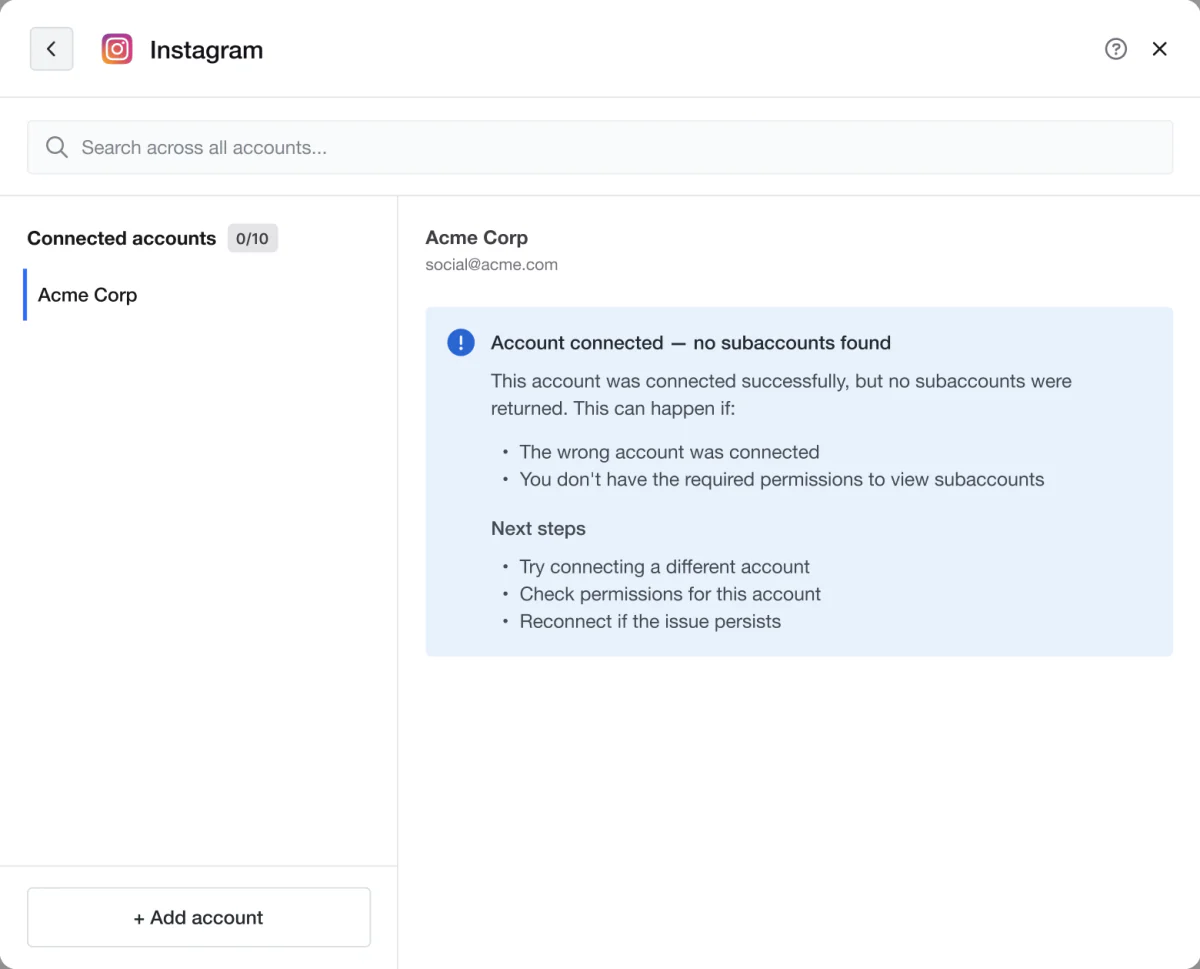
Authentication can succeed and still return no subaccounts to connect.
A common support complaint
“I connected my account and I don’t see anything.” I designed this state to tell users what happened instead of leaving them guessing.Finding the real cause
Working closely with the developer, I pinned down why this happened, so we knew when to surface this state and what to suggest.Nearing a connection limit
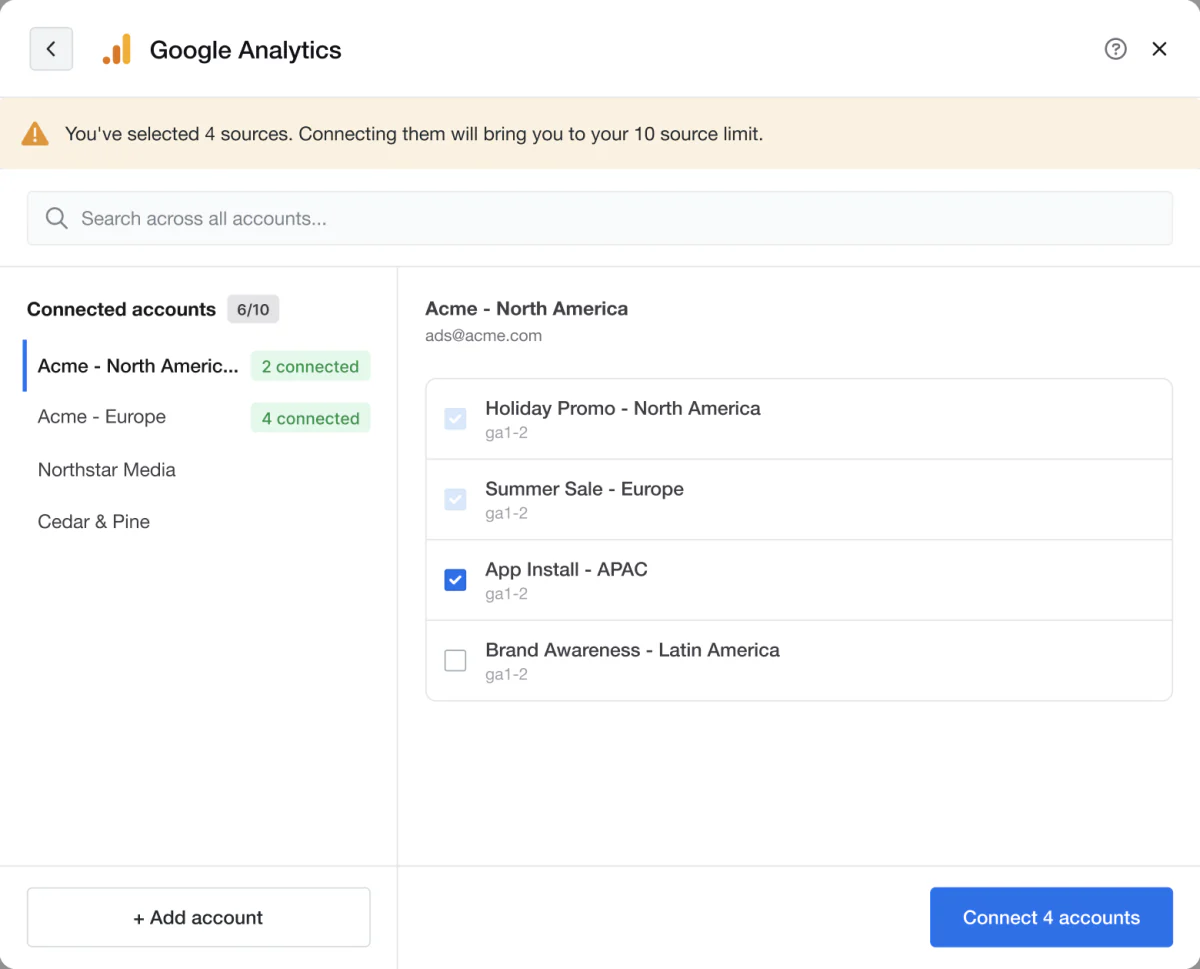
Each client has a connection limit per data source, such as 10 Google Analytics connections. This state warns users as they approach the limit, so it doesn’t come as a surprise mid-task.
Selection is capped at the remaining slots
Once the selected accounts fill the limit, the remaining checkboxes are disabled, so users can’t select more than they can connect.At the connection limit
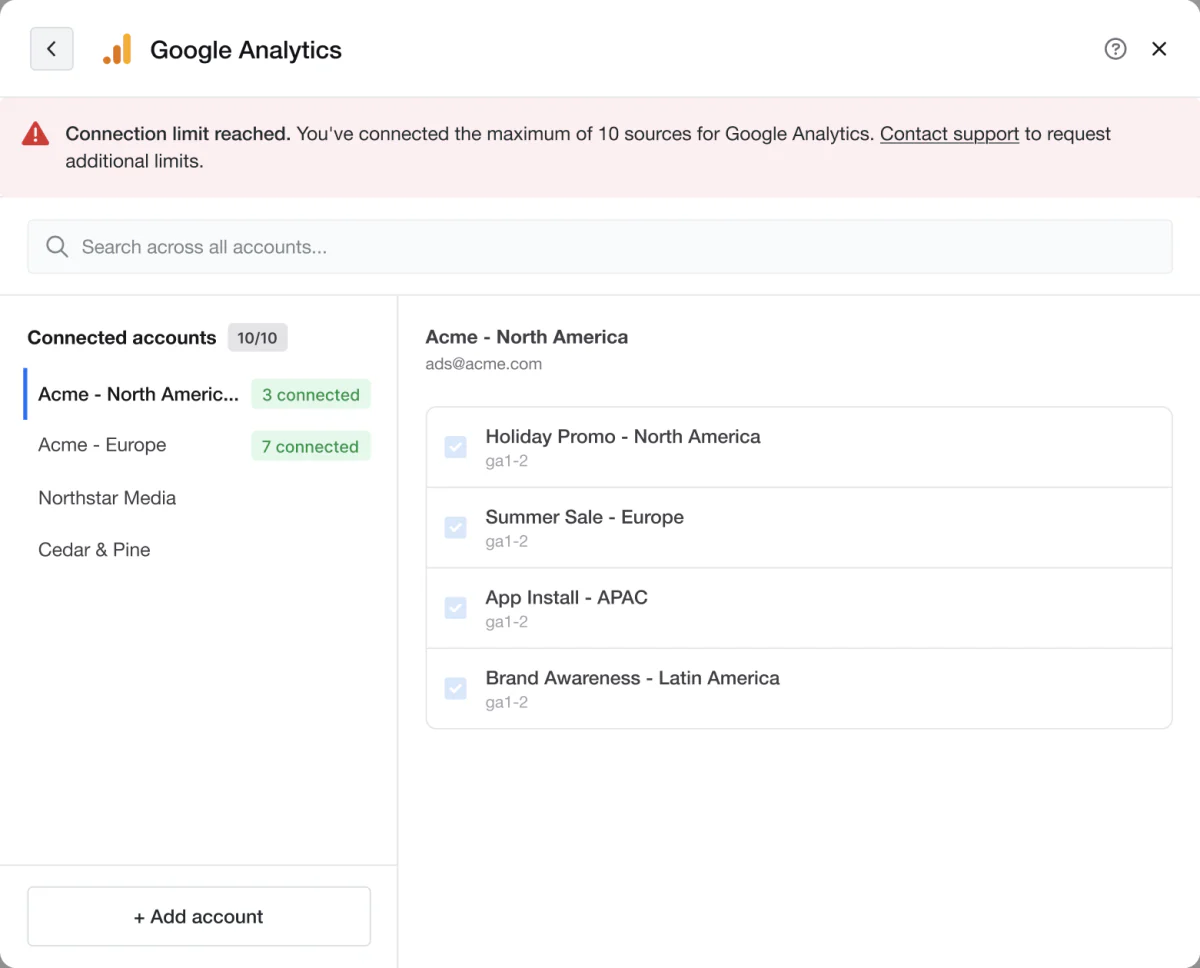
Once a client reaches the limit for a data source, this state explains why no more connections can be added, instead of letting users start a connection that would fail.
Not a hard cap
Customers can increase the limit through a contract with Sales. This state also directs customers to support for next steps.06. Visibility
Answer “what’s going on with this connection?” in place
I introduced a more consistent connection-information pattern and standard empty states, giving users authentication type, sync timing, and current connection status without having to search through the application.
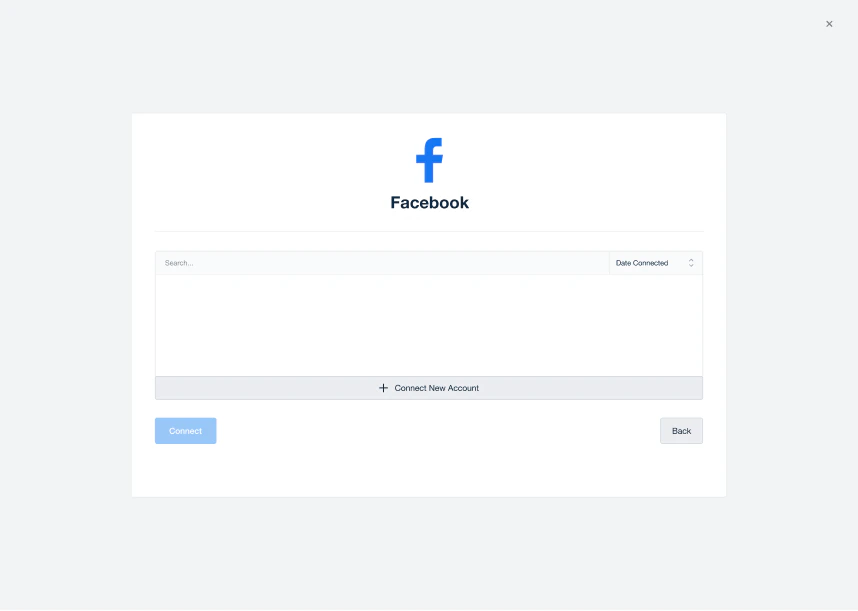 Before
Ask AI about a connection
Clicking “Ask AI” from the overview section opens the AI chat pre-loaded with context on that specific integration. Users can ask questions directly, and the AI can probe for more detail without them having to re-explain their setup.
07. Information architecture
Organize the page the way connections actually work
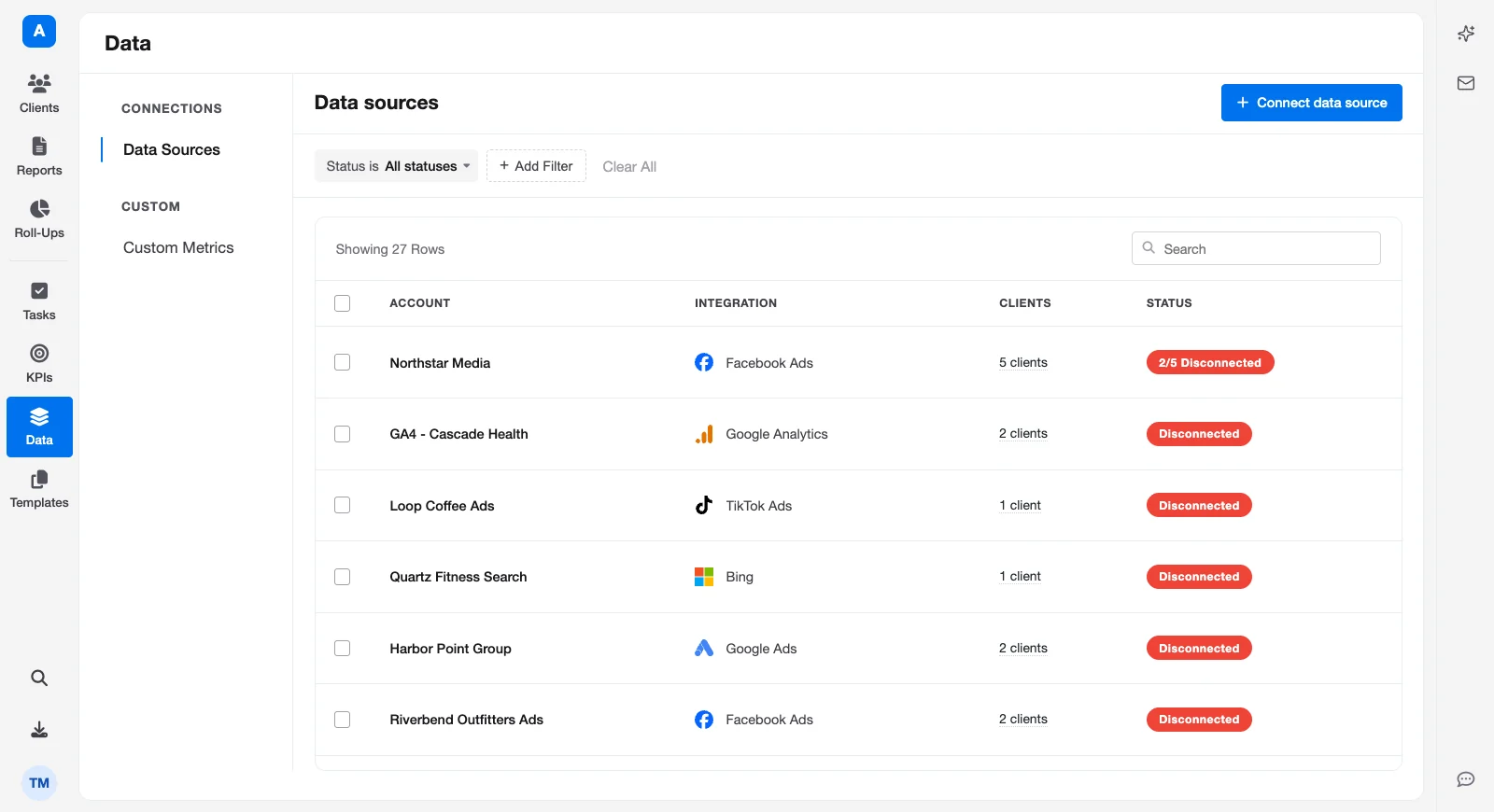
The Data Sources page is where agencies check and manage every connection across their clients.
Grouping by client
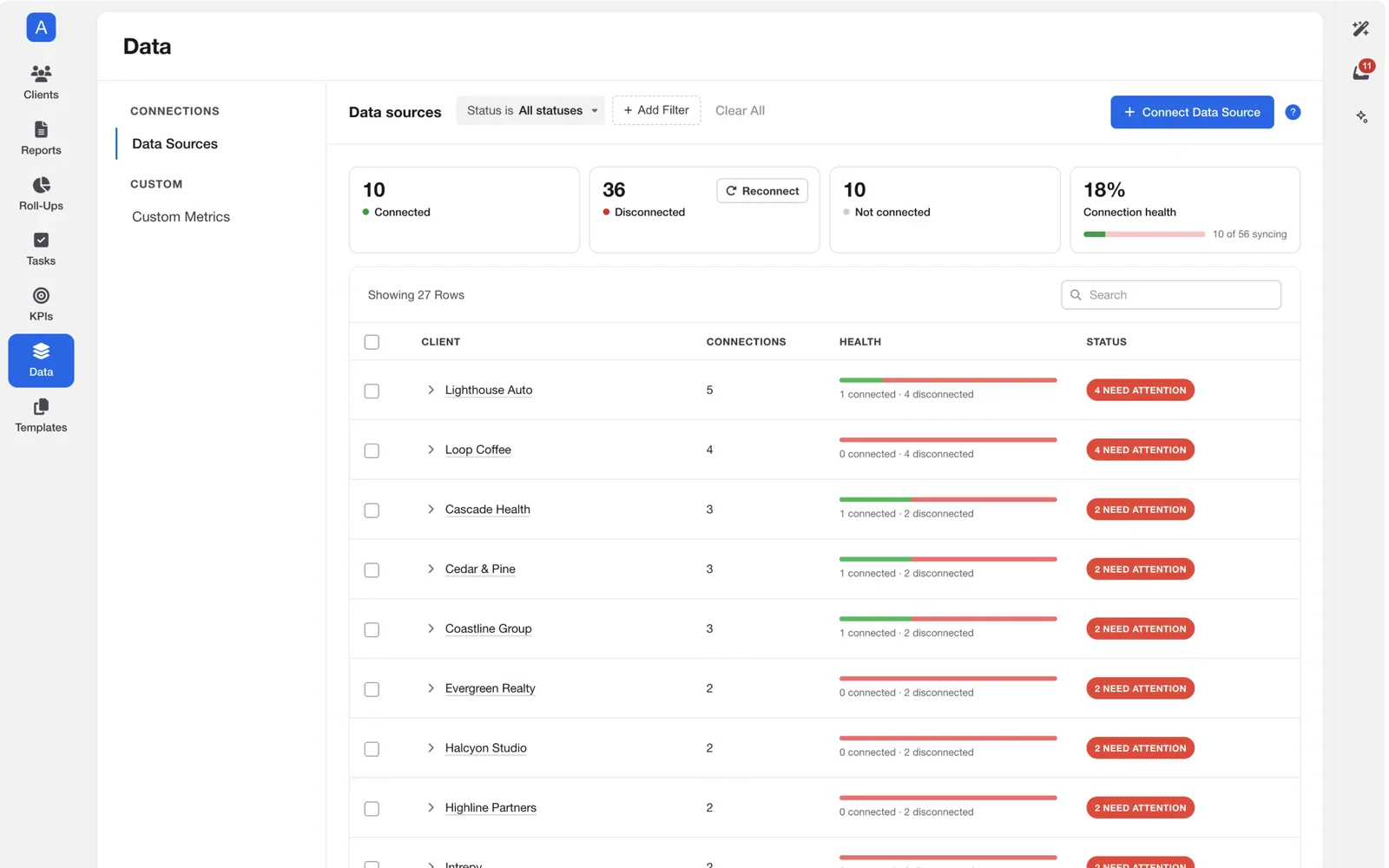
I explored nesting each client’s connections underneath it, with a health summary for each. It matched how agencies think about their work: “What’s connected to this client, and is their data healthy?”
Why I turned back
- It didn’t match the data model.One main account can be connected to many clients. Showing it under each client made a single account look like several independent ones, and made its real state confusing.
- It hid account-level problems.If 20 Facebook Ads connections disconnected at once, the problem was scattered across client groups.
The design decision
I kept the page organized by account, matching how connections actually work. This makes it easier to understand each account’s connection status and see which clients are connected to it.08. Relationship
Connections belong to something bigger
The redesigned management experience visually represents the relationship between the main account and its connected accounts.
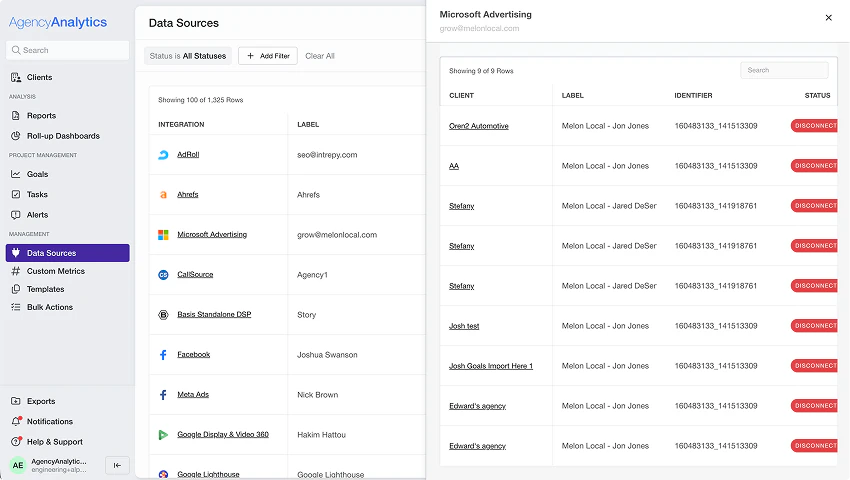
Instead of treating each connection as an isolated item, users can understand that these connections belong to a larger account. I also surfaced details about the main account to make the relationship clearer.
See connection details without leaving the account
Users can now view connection details directly from the main account modal. This removes unnecessary back-and-forth between account-level and client-level navigation and keeps the user focused on the connection they’re managing.
Before
The only way to see this information was to go to that client and click into the data source again.09. Management
The same controls, wherever you start
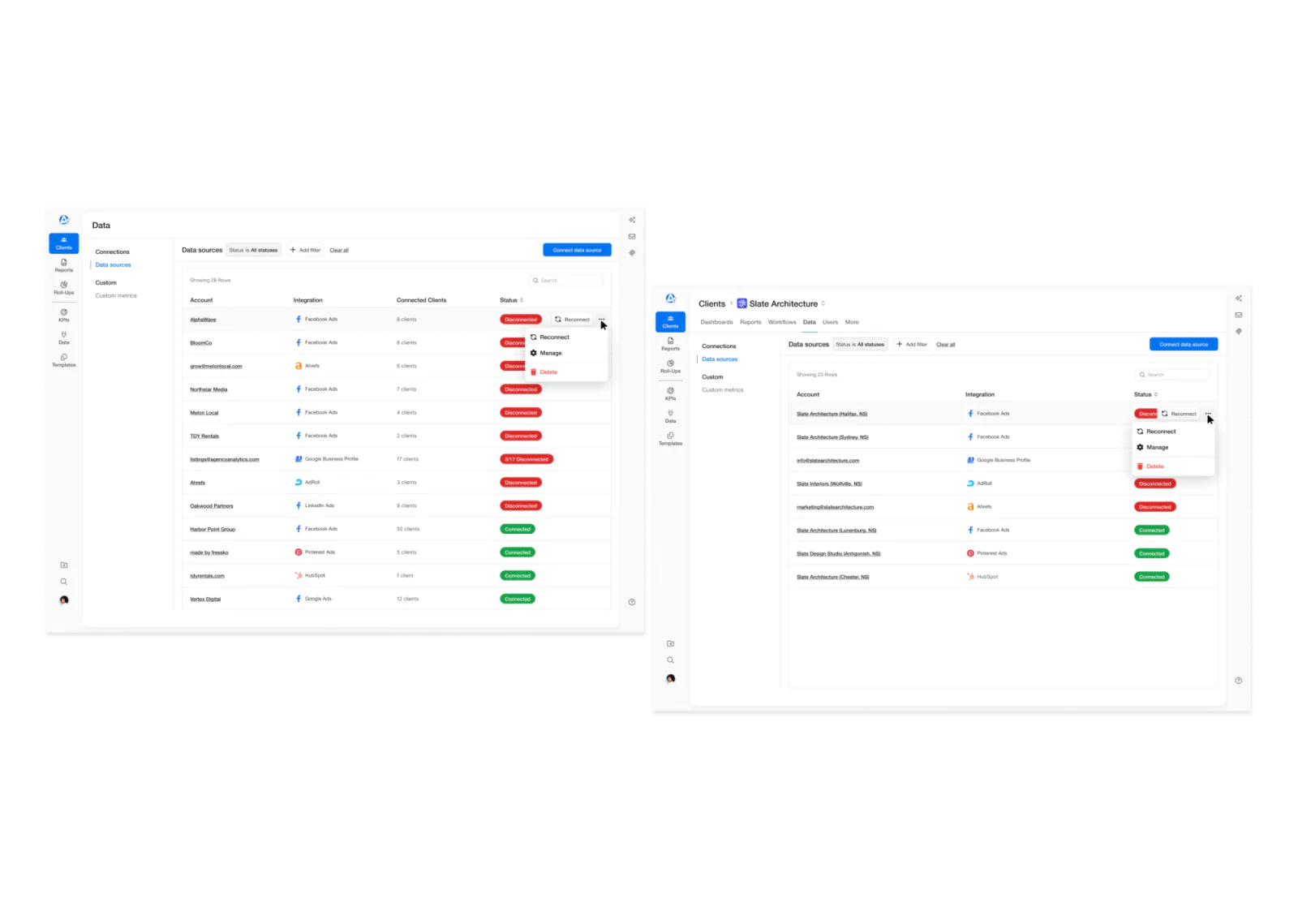
Consistent management controls
Management previously behaved differently depending on whether you were viewing a data source at the account level or client level. I made the controls consistent across both views, so users could reconnect, manage, and delete from either level.
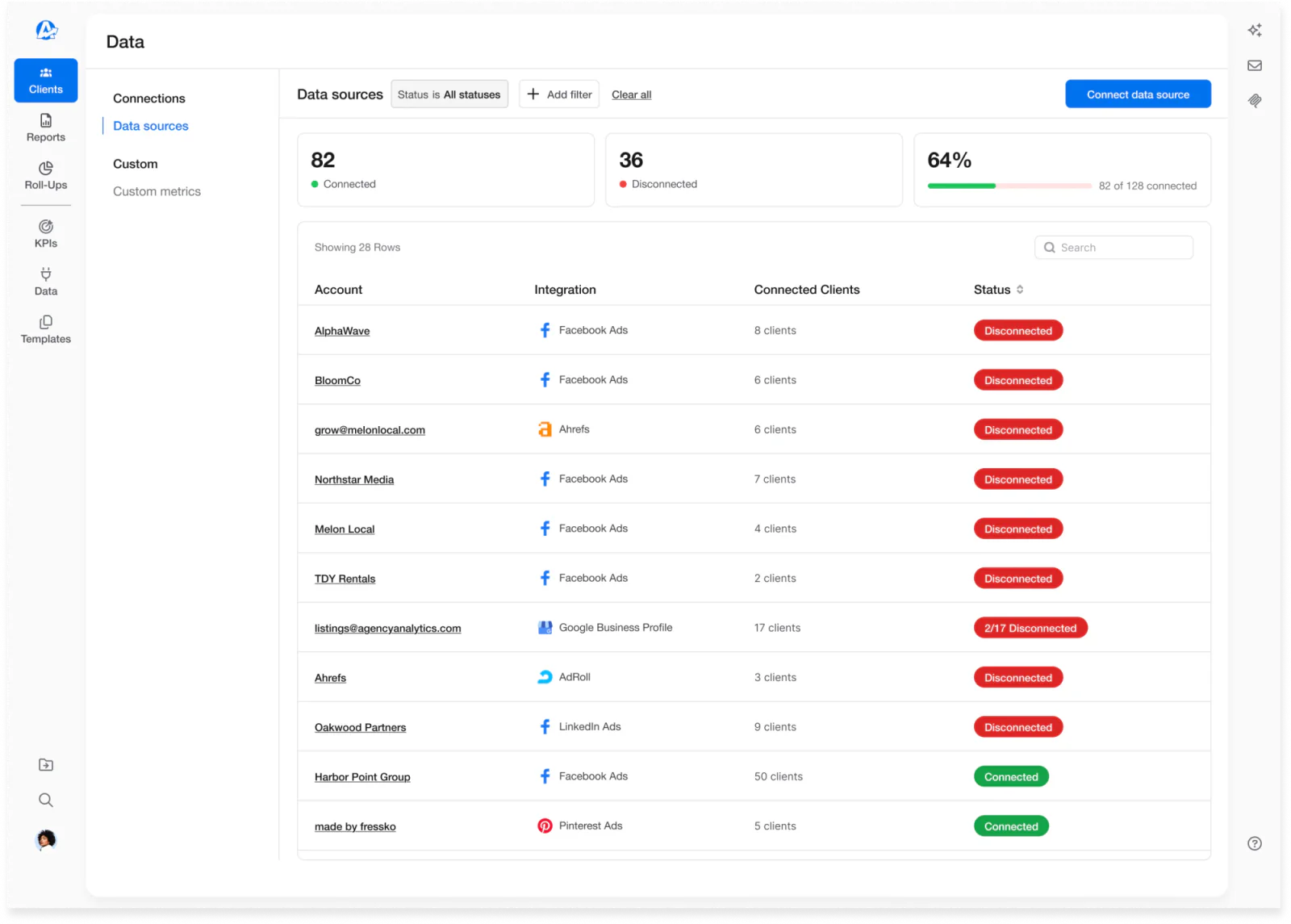
See account health at a glance
A brief overview now shows connected vs. disconnected counts per account. It answered a question users had every time they opened the page: “How healthy are my accounts right now?”
Filter by client
Users can filter an account to see which connections are associated with specific clients, answering a common question directly: “Which of my clients is using this account?”
Remove unnecessary blocking
Users couldn’t delete a main account while it still had connections, forcing them to hunt down and remove every client connection first.
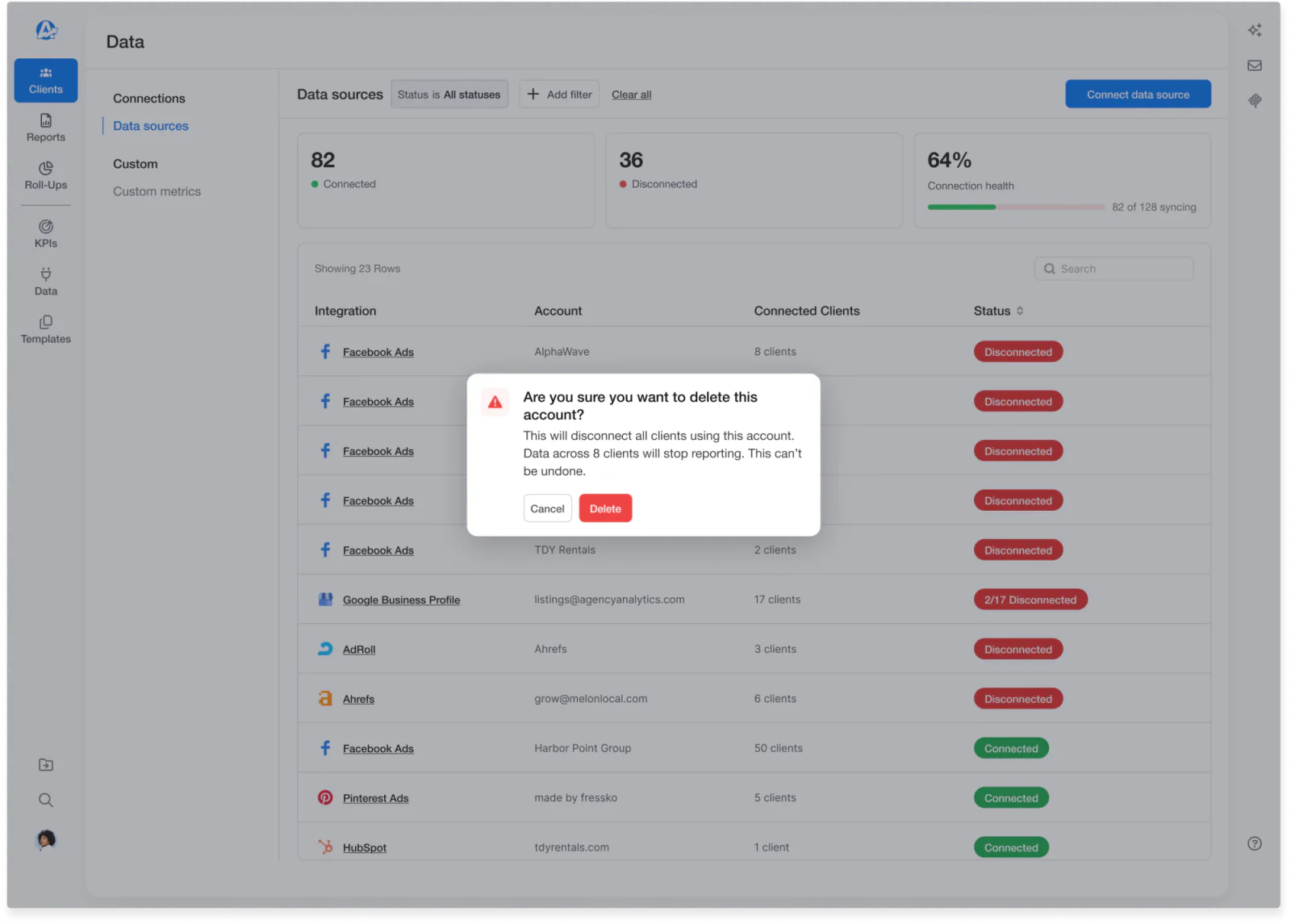
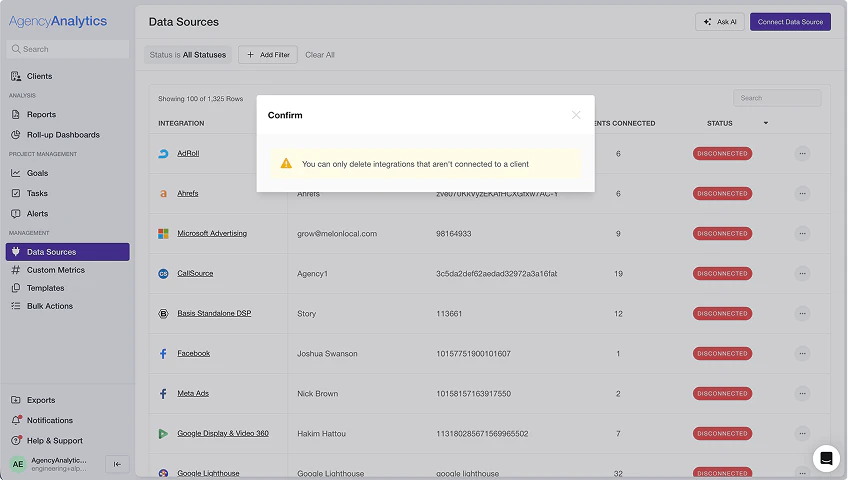
After: delete the account directly, with a clear warning about exactly what will be disconnected.
Before Deletion was blocked while connections existed.
The trade-off
Removing the block made deletion faster, but riskier: one action could now disconnect many clients. Keeping the block was discussed, but it was a consistent customer complaint, especially when cleaning up clients an agency no longer worked with.The design decision
Users can delete an account directly, with a clear warning about exactly what will be disconnected.10. Working with engineering
When “reconnect” could never work
One bug report stood out: a customer had disconnected subaccounts they couldn’t reconnect. The main account was still connected, so “reconnect” did nothing.
I worked with the integrations team to surface the actual state and guide the user to the right fix, rather than leaving them stuck retrying an action that could never succeed.
Under the hoodWhy the obvious fix didn’t help
- SymptomSubaccounts showed as disconnected and wouldn’t reconnect.
- WhyThe main account was still connected, so “reconnect” had nothing to do.
- Real causeA permissions problem that could only be fixed inside the external integration itself.
- Our fixShow the actual state and point the user to the fix in the integration.
11. Next steps
From configuring connections to reviewing them
Show available connections Concept
The proposed experience would surface available, unconnected subaccounts in a dedicated section, letting users quickly connect them to active clients. It would replace the tedious full connection flow:
- Select client
- Select data source
- Select account
- Select subaccount
- Connect
Repeated for every subaccount
Exploring AI-assisted mapping Concept
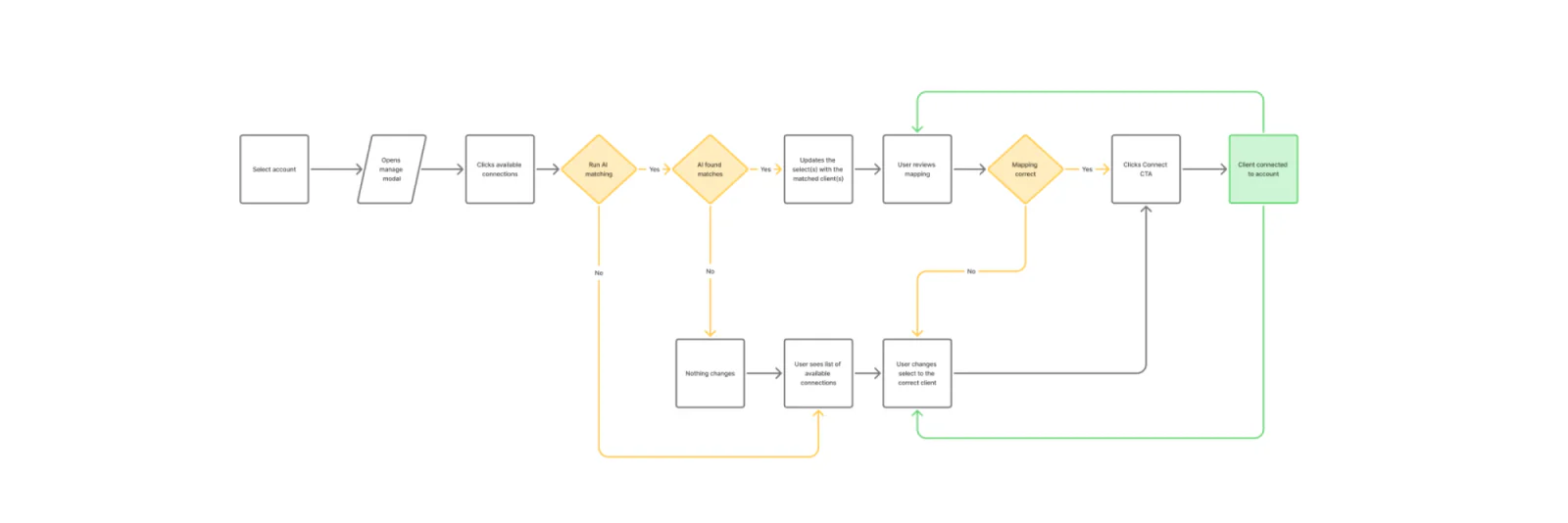
Connecting subaccounts to the right client was repetitive manual work. I explored having AI suggest likely client-to-connection matches, turning a configuration task into a quick review while keeping the user in control of every match before confirming.
ArtefactThe full AI mapping flow, as presented
12. Delivery
Too foundational to ship all at once
The scope was too large to redesign and release all at once, and data connections are foundational: a small mistake here could break a customer’s reports or dashboards.
I worked with the product and engineering managers to turn the audit’s findings into individual, prioritized tickets, giving us a roadmap while letting multiple developers work on separate pieces in parallel.
For each project, I worked closely with developers through implementation, writing detailed specs, answering questions, and reviewing visuals, usability, and interactions before every release.
Given how foundational this area is, we tested especially rigorously, using real customer tickets and support scenarios as concrete cases to validate against.
13. Results
What changed
less time to connect
Multiple accounts at once instead of one by one- ProblemUsers went through the connection flow one account at a time, with no way to select multiple.
- DecisionShow every available account after choosing an integration, and let users connect them in one pass.
- Outcome80% less time to connect.
addressed at the root
- ProblemOne of the most complained-about areas in NPS feedback: unclear states, inconsistent terminology, and no view of which clients were affected.
- DecisionAudit the whole experience, organize by account, and make connection information and management controls consistent.
- OutcomeThe underlying causes fixed, not just the symptoms.
What shipped
- Simplified connectionsLess manual work to connect and manage multiple accounts.
- Connection visibilitySee what’s connected, what’s affected, and what needs attention.
- Consistent management controlsThe same actions at both the account and client level.
14. Reflection
What I learned
Make complexity understandable.
Users shouldn’t need to understand the technical relationships between accounts and clients. The interface should make those relationships clear.
Break down large problems.
Splitting a broad redesign into prioritized, shippable iterations delivered value sooner, allowed multiple developers to work in parallel, and made the work easier to validate along the way.
Don’t overlook neglected parts of a product.
Auditing a long-untouched area uncovered both systemic usability problems and quick wins we could address immediately, improving the experience iteratively.
Try it